9-互斥体
内核级的临界资源访问怎么办?
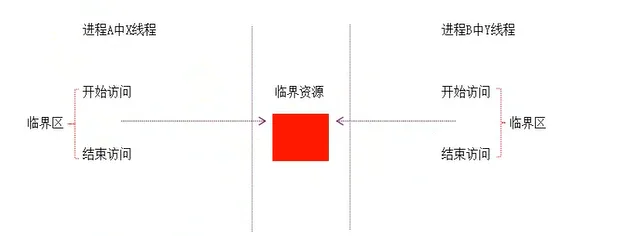
互斥体可以解决跨进程的临界资源访问问题。
互斥体是一种可以放在内核中的令牌。
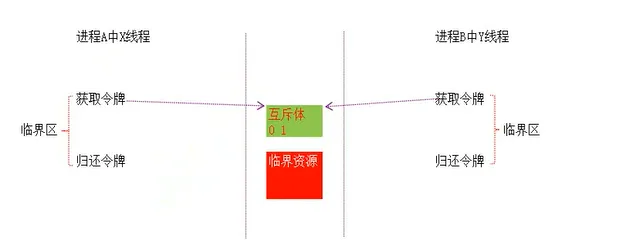
创建互斥体函数
HANDLE CreateMutex(
    LPSECURITY_ATTRIBUTES lpMutexAttributes,
     // pointer to security attributes
    BOOL bInitialOwner,
     // flag for initial ownership
    LPCTSTR lpName
     // pointer to mutex-object name
);
代码示例:
int main()
{
	//创建一个互斥体, FALSE表示创建互斥体后立马有信号,可以使用
	HANDLE hMutex = CreateMutex(NULL, FALSE, TEXT("mutex"));

	//获取令牌:有信号,线程的拥有者
	WaitForSingleObject(hMutex, INFINITE);

	for (int i=0;i<10;i++)
	{
		Sleep(500);
		printf("+++++++%d\n", i);
	}

	//释放令牌
	ReleaseMutex(hMutex);

	return 0;
}
互斥体与线程锁的区别:
- 线程锁只能用于单个进程间的线程控制
- 互斥体可以设定等待超时,但线程锁不能
- 线程意外终结时,Mutex可以避免无限等待
- Mutex效率没有线程锁高
可以使用互斥体来防止多开
创建互斥体的返回值:
If the function succeeds, the return value is a handle to the mutex object. If the named mutex object existed before the function call, the GetLastError function returns ERROR_ALREADY_EXISTS. Otherwise, GetLastError returns zero.
If the function fails, the return value is NULL. To get extended error information, call GetLastError.当已经存在一个互斥体后,在创建互斥体时,使用GetLastError函数会返回ERROR_ALREADY_EXISTS错误。以此来判断程序是否多开。
	DWORD dwRet = GetLastError();
	if (hMutex)
	{
		if (ERROR_ALREADY_EXISTS == dwRet)
		{
			CloseHandle(hMutex);
			return 0;
		}
	}
	else
	{
		printf("创建失败,程序退出!");
		CloseHandle(hMutex);
		return 0;
	}
评论讨论 (0) Artalk 自托管